6. Analyze
You have captures; now work out which byte is which signal. This is the core of reverse-engineering, and it's a reasoning process, not a single command:
- Inspect — see which bytes actually move.
- Reason — from what the ECU is, and how the byte behaves, form a hypothesis about what it could be.
- Test — check that hypothesis against the data (a known reference, a plausible range, correlation) without committing anything.
- Confirm or reject, then move to the next byte.
canair's analysis tools support each of those steps, and all work over your saved captures — no live car needed. Below is the workflow, worked through on a real example: finding vehicle speed.
First, two families of signal: continuous vs discrete
Before reasoning about any byte, work out which of two broad families it belongs to — they need different analysis tools, and getting this wrong sends you down a dead end (e.g. Pearson-correlating a gear enum against speed).
Continuous signals are a value on a number line: speed, voltage, current,
temperature, RPM, state-of-charge. Neighbouring values are meaningfully "close"
(91 km/h is just above 90) and arithmetic is valid — mean, min/max, and a linear
scale·x + offset all make sense. This is what Pearson correlation, --stats
distributions, and linear fits are built for. Most powertrain sensor bytes are
continuous.
Discrete signals take a value from a fixed set where the number is a label, not a quantity:
- Enums / state machines — gear, drive mode, fan level, charge state. A small
set of distinct integers;
Drive=3is not "one more than"Neutral=2, so spacing, averages, and min/max are meaningless. - Bitfields / flags — doors, locks, lights, relays: individual bits toggle independently with discrete physical events.
- Counters / checksums — a rolling frame counter or CRC: high-distinct, but with no physical quantity to decode. Recognise them so you don't waste time fitting a scale to noise.
Body and comfort modules (BCM/IGPM/HVAC) are mostly discrete; powertrain modules (BMS/MCU/VCU) are mostly continuous, with a few enum/flag bytes (contactor state, drive mode) mixed in.
Why the split drives the tooling:
| Continuous | Discrete (enum / flag) | |
|---|---|---|
| Fingerprint | many values, smooth motion | few distinct values, or independent bit toggles |
| Right statistic | Pearson/Spearman r, mean/stdev, variance-F |
Cramér's V, mutual information, edge timelines |
| canair tools | hunt, correlate, decode --stats / --corr / --discriminate |
correlate --method cramers_v, investigate --bits / --events, decode --discriminate |
| Model | linear expression (scale + offset) |
type: enum/bitmask + a values:/bits: map |
Your quickest classifier is the --stats distinct count over a varied
drive: 2–8 distinct values (or a byte whose bits toggle independently) is almost
certainly an enum/flag; dozens of smoothly-changing values is continuous.
The worked example below (finding vehicle speed) follows the continuous path. The discrete path — typed parameters and categorical statistics — is covered under Categorical signals further down.
Step 1 — Inspect: which bytes move?
A byte that never changes across your captures can't be a live signal. Start by diffing captures of the same PID taken in different conditions:
canair captures uds MyECU:2101 --diff --state driving   # byte-level diff across a drive
canair captures uds MyECU:2101 --diff --rulers          # overlay the byte-index ruler
(captures, correlate, and hunt are uds/can groups — uds is the
diagnostic domain and the default, so a bare canair captures MyECU:2101 …
works too; the can kind targets raw broadcast-CAN frame logs.)
The bytes that change are your candidates. The ones highlighted as you go from parked to driving are the ones carrying motion-related information. Map the raw payload to byte indices so you know exactly what you're looking at:
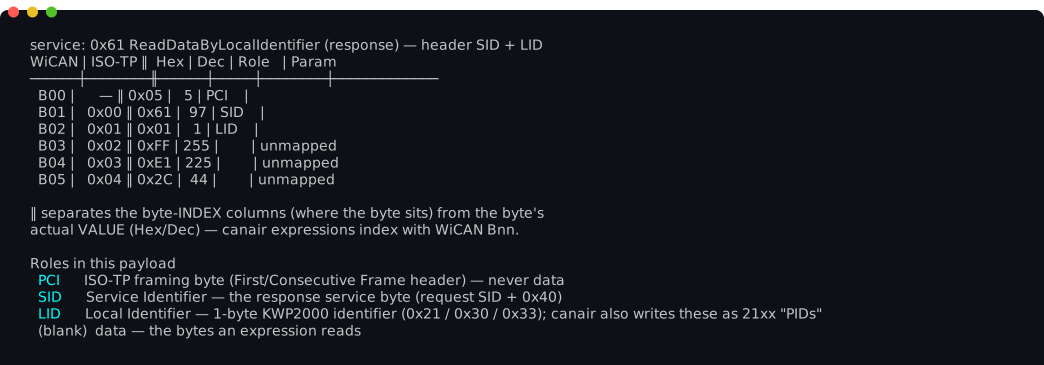
Byte indexing is the classic trap — WiCAN, ISO-TP, and Torque all count bytes differently, and there are transport (PCI) bytes you must not read across. See Byte indexing.
Reading several PIDs at the same instant
--diff shows one PID's history. When the question is "what did that byte do
while this other signal changed?", step through the captures instead and let
canair stack the PIDs into one time-joined frame:
canair captures uds "MyECU:2101,2102" --step              # two PIDs, stacked
canair captures uds "HVAC:220100,2201A0,2201A2" --step    # duct temps vs compressor
canair captures uds "VCU:2101 BMS:2101" --step            # across two ECUs
Each frame is anchored on a capture timestamp, with the other PIDs joined to the
nearest capture within --join-tol (10s by default — wide enough to span a full
round-robin monitor cycle over several ECUs). A block shows its Δt from the
anchor, and a PID
with no capture in range is reported rather than hidden, so you always know
whether you are looking at a real simultaneous reading.
Inside the stepper: ←/→ (or h/l) move between frames, ↑/↓ (or k/j)
scroll a tall frame (g/G for its first/last frame, Home/End for the view's
top/bottom), p adds/removes signals from the comparison,
J changes the join tolerance,
V switches rendering (signals drops the hex to fit more PIDs; changed
shows only parameters whose value actually moved), tab picks a block so
e can annotate that capture, and ? lists every key.
Moving between frames keeps your scroll position. A stacked frame is usually
taller than the terminal, so scroll down to the byte you care about — three PIDs
down, halfway through the hex — and then step with ←/→: the view stays put and
the numbers underneath change. That is what makes the stepper a comparator rather
than a pager. The frame's timestamp is repeated in the status bar so you still
know when you are while the frame header is scrolled out of sight, and Home
takes you back to it.
This is the fastest way to watch an event-driven signal: put the known signal (a compressor flag, a door state) in the same frame as the candidate byte, then walk the frames across the moment it switched.
Leave yourself landmarks. Press e on any frame to annotate that capture
("Heating started", "pressed the lock button"), then s to jump straight back
to it later: the jump list shows every session in scope, newest first, with its
noted captures nested underneath. That turns a long recording into a set of named
moments — write the note while you remember what you did, and the analysis becomes
"jump to the event, then step outward". A note also survives into
canair captures --sessions, so it is a durable record rather than a UI bookmark.
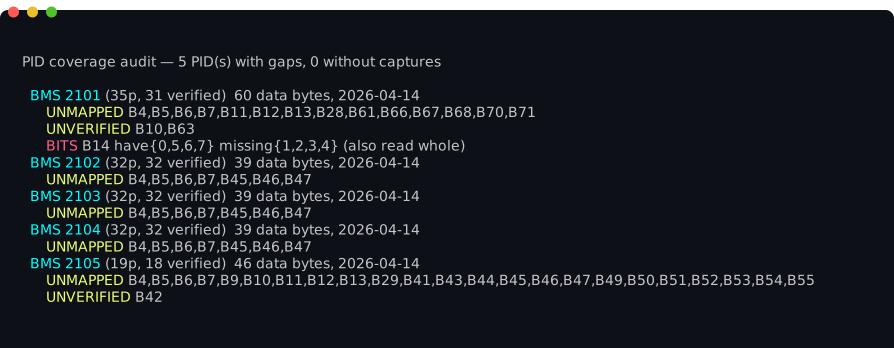
To see what's still undecoded across a whole ECU (or PID), canair coverage
audits every parameter expression against the longest captured payload and lists
the unmapped and partially-decoded bytes:
Step 2 — Reason: what could this byte be?
Before guessing offsets, ask what would this ECU need to report? An ECU's job constrains what its bytes can plausibly be:
- A BMS reports cell voltages, pack current (signed, symmetric about zero), temperatures (slow-moving), state-of-charge (0–100%).
- An MCU/inverter reports motor RPM and torque (signed, symmetric under regen), and several component temperatures.
- A body module (BCM/IGPM) reports mostly discrete things — lights, locks, doors — as bitfields, not continuous values.
The byte's behaviour narrows it further:
- Range & distribution — a value bounded 0–100 is likely a percentage; one symmetric about zero is likely signed (torque, current).
- Speed of change — temperatures drift slowly; loads/currents jump fast.
- Distinct values — a handful of discrete integers is an enum/state machine, not an analog reading.
For our example: on a drive, a byte that sits at 0 while parked and climbs smoothly to ~100 as you accelerate, staying non-negative, looks a lot like speed in km/h.
canair decode --stats gives you the distribution to reason from:
canair decode MyECU 2101 --stats                  # n / distinct / mean / stdev per byte
canair decode MyECU 2101 --stats --group-by state # per-state means (parked vs driving)
Step 3 — Test the hypothesis (without committing)
Now confirm it with evidence. The single strongest lever is correlation against a signal you already trust — often a known signal on another ECU captured during the same drive.
If you have a reference signal, let canair hunt do the search for you: it
sweeps every byte offset and interpretation on the PID, correlates each against
the reference, and reports the best fit with a physical-unit guess:
canair hunt uds MyECU:2101 --against ESC:22C101:REAL_SPEED_KMH
# → B12  r=0.99  y = 1.00·x + 0.3   (looks like km/h)
ESC:22C101:REAL_SPEED_KMHhere is a known speed signal from the bundled Ioniq profile, used purely to illustrate. On your car the reference is whatever signal you've already verified (or an external anchor like GPS-logged speed) — the technique is the same.
Reference an external log (a calibrated meter, a GPS speed track, a
grid-voltage export) with --against-file — a two-column timestamp,value CSV,
joined by nearest timestamp exactly like an on-bus reference. This is the only
way to hunt a signal that has no correlate on the bus:
canair hunt uds MyECU:2101 --against-file gps_speed.csv    # vs an external track
canair correlate uds --against-file grid_voltage.csv       # rank every byte vs it
The CSV must be on the same absolute wall clock as your captures. A relative/zero-based log will parse but join to nothing (reported as
n=0).
An r near 1.0 on byte 12 with a ~1:1 linear fit is strong evidence that byte
12 is speed in km/h. That's our hypothesis, confirmed by data.
If you're not sure what relates to what, let canair correlate rank every
strong cross-signal relationship in the drive, then focus:
canair correlate uds --overlap --state driving   # which PIDs share a timeline?
canair correlate uds --state driving              # rank the strongest pairs
Test an exact expression against all captures without editing any YAML:
canair decode MyECU 2101 --try "SPEED_KMH=[B12]" --stats
canair decode MyECU 2101 --try "SPEED_KMH=[B12]" --corr ESC:22C101:REAL_SPEED_KMH
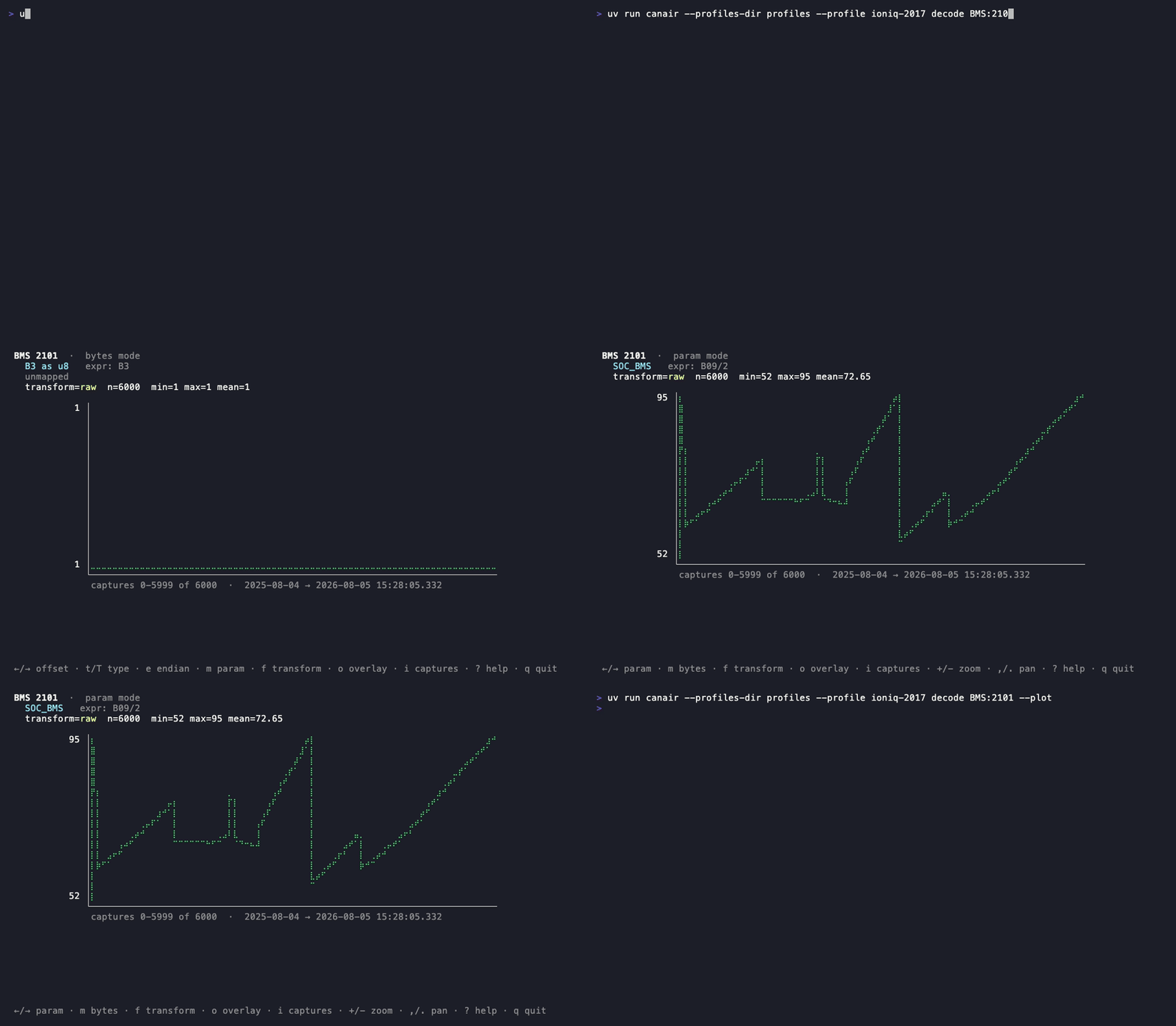
canair decode MyECU 2101 --plot               # interactive: sweep interpretations visually
--plot opens an interactive explorer: step through parameters/bytes, sweep
u8/i16/f32 interpretations and endianness, apply transforms, and read off
the equivalent WiCAN expression — all against your saved captures, no car needed:
Dump the raw bytes as a timestamp × byte-offset matrix when you want to
analyze outside canair (a spreadsheet, a scratch script) — the structured escape
hatch, CSV by default or --json:
canair decode MyECU 2101 --dump-bytes                 # CSV to stdout (PCI skipped)
canair decode MyECU 2101 --dump-bytes --json          # same, as JSON
When a signal fights back: confounders, plausibility, independence
Correlation-based tools fail on a signal that has no clean anchor on the bus — one that's masked by a dominant driver, or that correlates with nothing at all. Three levers for those cases (all worked through in the AC input voltage case study):
# Confounder control: rank by the PARTIAL correlation, with a nuisance signal
# regressed out — surfaces a link hidden behind a dominant driver.
canair hunt uds OBC:2101 --against-file grid_v.csv --control OBC:2101:OBC_DC_A

# Physical plausibility: no reference at all — flag bytes whose scaled value
# lands in a named band (mains RMS/peak, line freq, 12V rail, HV pack).
canair hunt uds OBC 2101 --physical --state charging

# Active-but-independent: rank bytes that separate by state yet DON'T track a
# named driver (the fingerprint of AC voltage vs charge current).
canair investigate MyECU 2101 --independent-of OBC:2101:OBC_DC_A --state charging
800 V pack or a non-EU grid? Tune the bands first
The physical bands default to a ~400 V EV on a 230 V / 50 Hz grid, so on a
mismatched car/grid the --physical scan can silently find nothing. For an
800 V architecture set the HV band in your profile —
physical_bands: { hv_pack: [450, 850] } (see
Profiles); if you're not on a 230 V / 50 Hz
grid set your region — canair config set grid_region US (see
Configuration) — before running --physical.
The one-shot shortcut: investigate
canair investigate bundles inspect + reason + correlate into a single report:
for every varying byte it tells you whether a parameter already maps it, how well
it separates across vehicle states, and its strongest relationship to a
co-captured signal — with a unit guess. Point it at an unknown PID first:
canair investigate MyECU 2101 --state driving
canair investigate MyECU 2101 --bits     # rank toggling bits too (body/discrete signals)
canair investigate MyECU 2101 --events   # edge timeline for narrated door/lock/hood captures
Each byte also carries a one-word triage class — constant / counter /
checksum / enum (a live analog byte is left unlabelled) — a cheap first read
of what kind of field it is. And a probable multi-byte words section flags
adjacent [Bn:Bn+1] pairs shaped like a scaled 16-bit value (a near-constant
high byte next to a full-range low byte) — the exact shape a scaled voltage takes
when it hides across a byte boundary.
It's the fastest way to get oriented; the individual tools above are how you follow up on what it surfaces.
Odometers, hour meters and cycle counts: --counters
The triage counter class above spots a fast rolling byte — a message/alive
counter cycling through every value. It cannot find the counters you actually want
a name for, because they are slow: an odometer or an operating-hours tally does not
move at all within one recording session, so it looks constant to every tool on
this page, correlation included.
--counters asks the one question that finds them — which byte windows only ever
go up across the entire capture history?
canair investigate MyECU 2101 --counters
canair investigate MyECU 2101 --counters --unmapped-only   # skip what's already verified
It sweeps 1–4-byte windows in both endiannesses (a real odometer is usually 3 or 4 bytes) and sorts hits into accumulators (rise within sessions too — odometer, cumulative Ah/Wh), cycle counters (flat inside every session, stepping only between them — ignition/trip counts) and run timers (ramp and reset each session, tracking wall-clock — uptime).
Two things to know before you trust a hit:
- Evidence is reported in bits. Each clean rise with no fall is one bit, so a window at 3 bits rose three times and never fell — a 1-in-8 coincidence, i.e. a lead, not a finding. A long-running accumulator scores in the hundreds. Don't write a parameter off a handful of bits; go get more captures across more days.
- Don't scope it. This is the one analysis that wants your whole history —
--state/--sinceshorten the horizon, and the horizon is the evidence.
The magnitude usually identifies the signal on sight: a 3-byte window reading
70047 → 73048 over four months is a kilometre odometer, and one reading
21268317 → 22312975 at roughly one per second is an operating-second counter.
Cross-check a distance candidate against your cluster odometer, and confirm it is
distance and not time by checking that its ratio to a known time counter is not
constant.
See Analysis commands for the fingerprint table and the ISO-TP window details.
Categorical signals: modes, flags, schedules
This is the discrete family from the taxonomy above — a fan level, a climate
mode, a gear, a day-of-week schedule mask. The worked speed example took the
continuous path; here the numeric spacing is meaningless (Drive=3 isn't "one
more than" Neutral=2), so Pearson correlation and the variance-F don't apply.
canair models these as typed parameters (enum/bitmask/ascii/date/
struct) and analyzes them with categorical statistics — see
Typed signals for the model. The analysis levers:
# "Which byte is the fan setting?" — rank by nominal association, not linear r
canair correlate uds HVAC --against HVAC:220100:HVAC_FAN_LEVEL --method cramers_v

# "Which byte separates the power states?" — Cramér's V for typed params
canair decode HVAC 220100 --discriminate state

# Once defined as an enum, see the transitions as labels over time
canair investigate HVAC 220100 --events --field HVAC_FAN_LEVEL
# → 10:05:00  fanMAX (45) → fan1 (40)
--method cramers_v / --method mutual_info treat each distinct value as a
nominal category — the right question for a mode/flag/enum byte. For a body
module's discrete bits, investigate --bits and --events remain the entry
points.
Decoding "set" commands: toggle and diff
Some of the most interesting signals aren't read — they're written by the car (the head unit setting a preheat schedule, a clock, a charge timer). Two things make these harder:
- On a gateway-isolated OBD port you often can't sniff the write itself (see Broadcast frames for the raw-CAN path when you can).
- The result is a structured record (day-mask + time), not one byte.
The reliable device-only workflow is toggle → re-read → diff:
# 1. Read the DID that stores the setting, before the change
canair read BCM:22B00C --save --label "schedule: before" --state ready

# 2. Change the setting on the car (set preheat to a different day/time)

# 3. Re-read the same DID, after
canair read BCM:22B00C --save --label "schedule: after" --state ready

# 4. Diff the two payloads to see exactly which bytes moved
canair captures uds BCM:22B00C --diff

# 5. Model the changed bytes as a typed field and test it
canair pids upsert-param BCM 22B00C PREHEAT_DAYS B3 \
    --type bitmask --bit 0=mon --bit 1=tue --bit 2=wed --bit 3=thu \
    --bit 4=fri --bit 5=sat --bit 6=sun --unverified
canair decode BCM 22B00C
For a whole schedule record, define a struct param whose ordered fields:
cover the day-mask, hour, and minute — investigate --events --field then reads
each schedule change as one logical {days=…, hour=…, minute=…} transition.
Be rigorous
A hypothesis is a hypothesis until the data confirms it. Don't accept a byte because it "looks about right" — check the range, the distribution, correlation against a known reference, and physical plausibility across states. State your confidence honestly. This is exactly why the next step starts every new parameter as unverified.
The full reasoning toolkit — thermal-mass tricks, signed/symmetry tests, conservation laws (P ≈ V·I), enum/counter fingerprints, endianness sweeps — is documented in depth in the
reverse-engineer-signalagent skill (.claude/skills/reverse-engineer-signal/). This page is the human-facing tour of the same workflow.See it fight back: Finding the hidden AC input voltage is a full case study of this workflow applied to a signal that resisted every obvious approach — a good read for why the rigor above matters.
You now have a confident hypothesis ("byte 12 of MyECU:2101 is speed in
km/h"). Next: 7. Define & verify → turns it into a
stored parameter.